Introduction
This is a study guide for Google Cloud Platform Professional Architect certification.
Google Cloud is a huge platform. And the certification exam is hard. Not just because GCP is big; but because it touches a lot of technologies and concepts that are not part of Google Cloud per se; but you need to know because it is user in real life(tm).
Motivation
I passed the GCP Architecture exam in beta form two years ago and this are my notes to recertify myself.
The Google Cloud has changed a lot (hello KNative!). There are more services now, and some of the services that were in beta when I took the exam for the first time are in GA and are covered in the exam now.
Where to Start
If you're a seasoned professional with experience in other clouds, I reccomend you to:
- Check first the chapter about how to structure work in google cloud.
- Take a look at the core services
- And Understand IAM
Then you can skip directly to the service you need to know about in depth.
How stuff works in Google Cloud
Or... in other words, how much is going to cost me this stuff, and how can I control this?
Outline:
- Global and regional services.
- Billing structure: organizations, projects, and folders.
- Undestanding IAM
Global and Regional Services
Before we start deep down in services, we need to know the difference between global, regional services.
Maybe this is a bit too soon to see stuff like this; don't worry, you'll revisit this section later and you'll understand it perfectly.
Some GCP services are "global" in the sense they don't run on a specific part of the world.
A good example of a globally available service is the DNS. There is no concept fo a "local" DNS. The DNS service can be accessed anywere, right?
Another good example of global service is IAM. You will know a bit about IAM soon. By now, just think about permissions and identity: it makes sense to have a a global view of identity and permissions (this is a global service).
Think the opposite: what kind of nightmare would be having permissions and identities scattered all over the cloud?
Resource Organization and Billing (projects, folders, and organizations)
The most important resource in Google Cloud is the project. In Google cloud every resouce must have a project. It doesn't matter if it is a global service or its resources are only in a region of the world: every resuce belogs to a project. Period.
You can give the "meaning" you may want to a project (lika a project you work on for a customer, a cost center, etc.). But take into account this:
** Projects are the root everything, including billing in google cloud **
What does it mean? When you create a resource in GCP, all charges related to that resource goes to the project where the resource was created. When you want to know how much you spent in a service, like compute engine, you don't need to tag resources, or search for them in different cloud areas like in other vendors. You just look for it the project it was created.
Projects are also a boundary for resources. When you need to use resorces from another project, you'll need to configure AIM permissions and (maybe) network access.
Folders
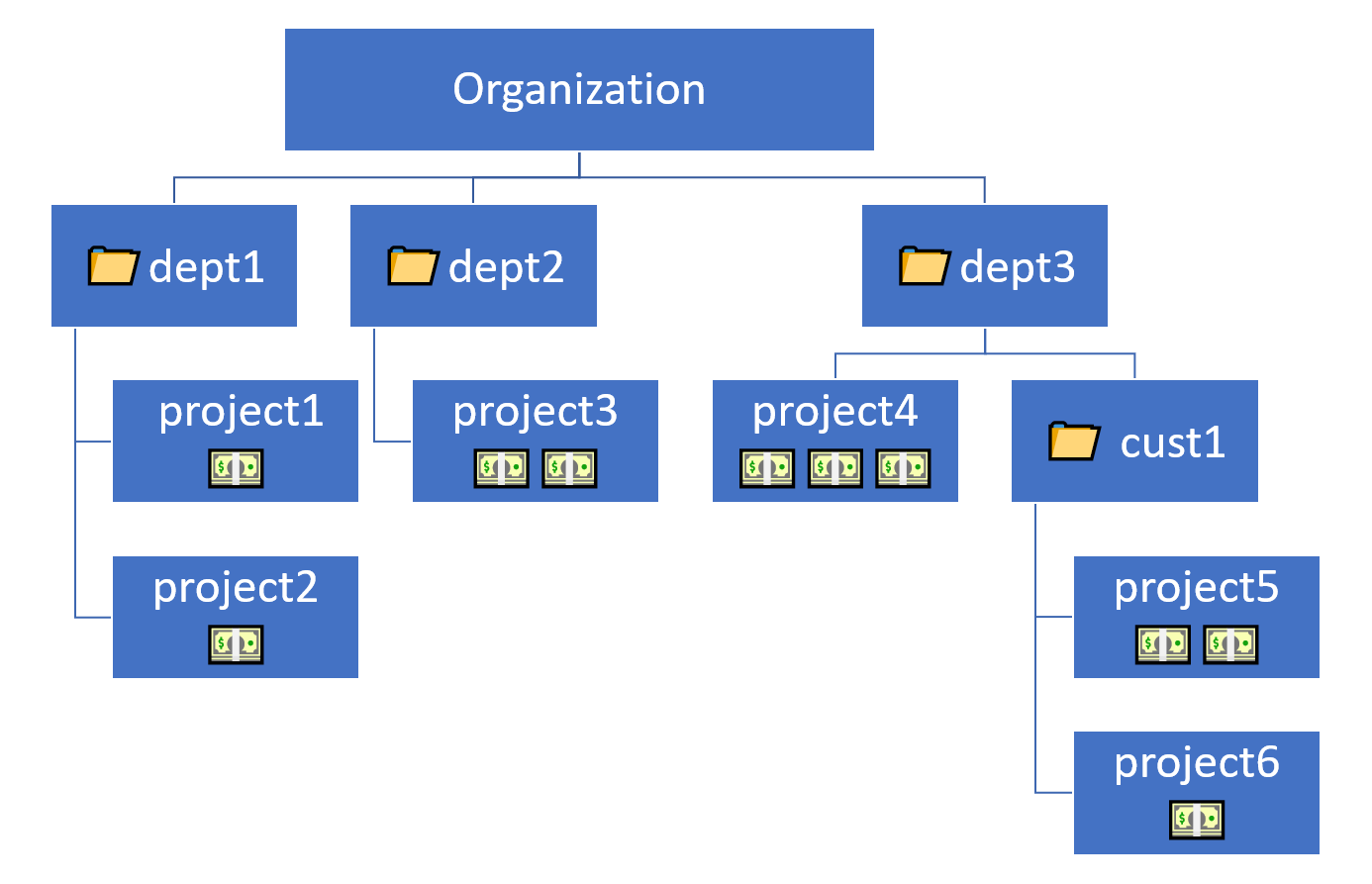
You can group several projects into folders. Folders can contain other folders.
When you put something (project or folder) into a folder it works like in the real world: it is inside to exactly one folder. It can't be in two places (folders) at the same time.
Folders make easy to classify projects and aggregate charges. It is very usual to aggregate all projects for a specific customer or a cost center into a folder to look up easily all the charges.
Organizations
At the top of the hierarchy we have an organization. Organizations are useful when you want to integrate your internet domain and/or identities into google cloud.
Think about organizations as the top of an LDAP hierarchy like O=Organization,OU=folder_name,OU=project
Core Services
These are the sercices wich are the core, the essence, of the Google Cloud Platform (GCP) environment.
Altough Google does not endorse this services as their 'core' services, in fact all those services are the base you need to build your applications and/or infrastructure on GCP.
Note that other services will use the services described here. For instance, both Dataflow and Dataproc will use Compute Engine to launch instances. Even it is possible to log in via ssh or from console and look what's going on inside the machines that provide advanced services.
Core services list
- Storage:
- Cloud Storage
- Cloud SQL
- Compute:
- Compute Engine
- App Engine
- VPC Networking
- IAM